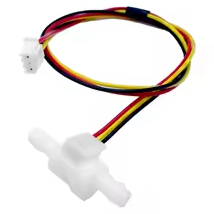
Tank Pool Horizontal Water Level Switch Liquid Level Sensor Liquid PP Plastic Ball Float Switch For Arduino
KSH 455.00
Out of Stock
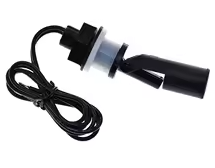
This horizontal float switch provides accurate liquid level detection for tanks, pools, and reservoirs. Its PP plastic construction ensures durability and corrosion resistance for water-based applications[citation:2].
| Parameter | Value |
|---|---|
| Material | Polypropylene (PP) |
| Mounting | Horizontal side-mount |
| Contact Rating | 10W max |
| Switching Voltage | 100V DC max |
| Switching Current | 0.5A max |
| Temperature Range | -10°C to +85°C |
| Output | Digital ON/OFF (reed switch) |
= Key Features =
CorrosionResistant PP Suitable for water and non-corrosive liquids
Configurable Output - Can be wired as NO or NC
Compact SideMount Design Easy tank wall installation
Long Service Life - Reliable reed switch mechanism
Simple Integration 2wire interface for Arduino[citation:2]
√ 2-wire connection for easy wiring
√ Corrosion-resistant PP construction
√ Works with Arduino, ESP32, Raspberry Pi[citation:2]
Wiring to Arduino:
Reading the sensor:
digitalRead(pin) to get stateAlways treat this as a low-current signal device. For controlling pumps or other loads, use the sensor to trigger a microcontroller, which then activates a relay or MOSFET[citation:1]. This protects the reed switch from damage.
Simple Interface - Just two wires and a resistor
Safe Operation Lowcurrent sensing protects the switch
√ 10W contact rating for control signals
√ PP body resists water damage
Sensor not triggering:
Erratic readings: