8pin 4x4 4*4 Matrix 16 Keys Button Keypad Keyboard Breadboard Module MCU for arduino Diy Kit – KSH 300 at HIMASTORES Mombasa – best electronics in Kenya

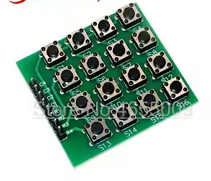
8pin 4x4 4*4 Matrix 16 Keys Button Keypad Keyboard Breadboard Module MCU for arduino Diy Kit

SKU: HMJ766 Category: Modules
KSH 300.00
Out of Stock

Product Description

8Pin 4x4 Matrix 16Key Button Keypad Module

Breadboard-Friendly Keyboard for Arduino DIY Projects

This 4x4 matrix keypad module provides 16 programmable buttons in a compact breadboard-friendly design. Using only 8 pins (4 rows and 4 columns), it expands user input capability for Arduino and MCU projects.

16 Keys in One Module - Full numeric and function keypad
Matrix Scanning - Only 8 pins for 16 buttons
Use with Arduino keypad library for easy scanning
Add pull-up resistors for stable reading
Do not exceed 5V logic level

Technical Specifications

ParameterValue
Key Arrangement4x4 Matrix
Number of Keys16 buttons
Pin Count8 (4 rows + 4 columns)
Contact TypeMomentary tactile
Operating Voltage3.3V to 5V
InterfaceDigital I/O
MountingThrough-hole or breadboard

= Key Features =

Compact Design - Small footprint for tight projects

Standard Layout - 4x4 grid with clear labeling

Breadboard Friendly - 2.54mm pin spacing

Durable Buttons - Rated for thousands of presses

Tactile Feedback - Clicky response when pressed

= Applications =

  1. Security keypad entry systems
  2. Calculator and counter projects
  3. Menu navigation interfaces
  4. Game controller input
  5. Industrial control panels
  6. Access code systems
Easy to Use - Works with standard Arduino libraries
Versatile Input - All 16 keys programmable

√ Includes pin headers

√ Ready for breadboard and PCB

√ Pre-assembled and tested

Connection Guide

Pin identification:

  • R1-R4: Row outputs (scanning)
  • C1-C4: Column inputs (reading)
  • Pins numbered 1-8 on module

Wiring to Arduino:

  • Connect all 8 pins to digital pins
  • Use any available I/O pins
  • Typical pins: 29 or A0A5
Use resistor array for pull-ups
Use external interrupts for low power
Do not connect pins directly to VCC
Avoid long wires to reduce noise

Matrix Operation

How scanning works:

  1. Set one row LOW
  2. Read all column pins
  3. Detect pressed key
  4. Repeat for each row
  5. Identify unique button pressed

Simple Scanning - Standard matrix technique

Quick Response - Fast enough for typing

Works with all Arduino boards
Software debounce included in library

√ Key labels for easy reference

√ Membrane or PCB options available

Programming Support

Keypad library functions:

  • keypad.begin() - Initialize
  • keypad.waitForKey() - Wait for press
  • keypad.getKey() - Check for press
  • Custom key mapping supported

Custom key assignment:

  • Map keys to letters, numbers
  • Create function keys
  • Multiple key combinations

Library Support - Keypad.h available

Easy Customization - Map any keys

Great for password entry
Used in DIY projects worldwide

√ Tutorials available online

√ Library examples included

Troubleshooting

No key detected:

  • Check wiring connections
  • Verify library setup
  • Avoid loose connections

Wrong key read:

  • Check pin mapping
  • Verify row/column assignment
  • Avoid stuck buttons