ESP32CAMMB WiFi Bluetooth Development Board with OV2640 Camera
Type-C USB Interface with Manual/Automatic Download Support
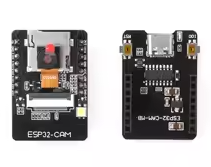
The ESP32CAMMB is a complete camera development solution featuring the ESP32 dualcore processor and an OV2640 camera module. It includes an integrated CH340 USBtoserial programmer, making it easy to upload code via the TypeC USB interface [citation:9]. The board supports both manual and automatic downloads, simplifying the programming process compared to traditional ESP32-CAM modules [citation:6][citation:12].
Integrated Programmer CH340G chip for direct USB programming via TypeC
8MB PSRAM - External memory for image processing
Operating voltage is 5V via USB; I/O logic is 3.3V
Supports OV2640 (2MP) and OV7670 cameras
Use a stable 5V/2A power supply for reliable operation
Technical Specifications
| Parameter | Value |
|---|
| Processor | ESP32 dualcore 32bit |
| Clock Speed | 240MHz (600 DMIPS) |
| SRAM | 520KB |
| PSRAM | 8MB external |
| Wi-Fi | 802.11 b/g/n |
| Bluetooth | 4.2 BR/EDR and BLE |
| Camera Support | OV2640 (included) |
| USB Interface | Type-C |
| USBtoSerial | CH340G |
= Key Features =
Integrated USB Programmer - CH340G chip eliminates need for external FTDI adapter [citation:2]
8MB PSRAM - Essential for camera frame buffering and image processing
DualCore Processing Runs FreeRTOS with LwIP stack [citation:1]
Supports Manual and Automatic Download - Easy firmware updates [citation:12]
TF Card Slot - Local image storage support [citation:8]
= Applications =
- Video streaming and wireless monitoring
- IoT camera projects
- Image recognition and QR scanning
- Smart home surveillance systems
- Face detection and recognition
Complete Starter Kit - Programming base with camera module
Easy Setup - Direct USB connection for programming and power
√ Includes OV2640 2MP camera and antenna
√ Supports Arduino IDE and ESP-IDF
√ Built-in PCB antenna with U.FL connector option
Connection and Programming Guide
The ESP32CAMMB base board simplifies programming by providing an onboard USBtoserial converter, making it a true "plugand-play" development platform [citation:6].
*Programming Setup:*
- Connect the board via Type-C USB
- In Arduino IDE, select "AI Thinker ESP32-CAM" board
- No need for external programmers or wires for programming [citation:9]
*Software Requirements:*
- Install CH340 driver for Windows systems [citation:2]
- Use the CameraWebServer example for quick testing
- Enable PSRAM support for camera operation
Use Arduino IDE 1.8.18 for stable PSRAM operation
Select Huge APP (3MB No OTA) partition scheme for best compatibility [citation:2]
Use 2.4GHz WiFi only the ESP32-CAM does not support 5GHz networks [citation:2]
Troubleshooting
Driver not recognized:
- Install CH340G USB driver from official source
- Avoid using charge-only USB cables
PSRAM not detected:
- Use Arduino IDE version 1.8.18
- Select Huge APP partition scheme [citation:2]
Wi-Fi disconnections:
- Use an external 5V/2A power supply
- Connect to 2.4GHz network only [citation:2]